
logologo
search_icon
search_iconAll
search_iconContinue Playing
search_iconHot Games
search_iconNew Games
search_iconSimulation
search_iconAdventure
search_iconAction
search_iconStrategy
search_iconCasual
search_iconRacing
search_iconPuzzle
search_iconSports
search_iconMore
AboutAbout
BusinessBusiness
PrivacyPrivacy
TermsTerms

© 2026 minigame.com

mascot

Join The Minis With Friends

search_icon
search_icon
search_icon
search_icon
search_icon
search_icon
search_icon
search_icon
search_icon
search_icon
search_icon
search_icon
more_icon
AboutBusinessPrivacyTerms
logo
Links

Links

Recommended

Brain Puzzle
Hexa Sort
Magic Match
Super Brain
Synthetic Milk Tea
Ludo Master
Bubble Shooter Pro
Bridge Warrior
Magic Flower Match
Nụ Hoa Vui Vẻ
Ốc Vít Vui Vẻ
Vẽ Vời Vui Vẻ
Bé Heo Vui Vẻ
Xây Cầu Vui Vẻ
Onet Puzzle
Ping Pong Precision
Links

Links

5puzzlePuzzle
Play Now
0
Like
Dislike
Add to favorites
Feedback
Links
Happy Match Together

Happy Match Together

Happy Match Together
Happy Match Together215.0K
Ludo King

Ludo King

Ludo King
Ludo King704.3K
My Garden Flower Match

My Garden Flower Match

My Garden Flower Match
My Garden Flower Match585.2K
Fruit Sort Master

Fruit Sort Master

Fruit Sort Master
Fruit Sort Master243.1K
Tetris Puzzle

Tetris Puzzle

Tetris Puzzle
Tetris Puzzle697.3K
Buy To Buy

Buy To Buy

Buy To Buy
Buy To Buy474.3K
Ball Hits Cup

Ball Hits Cup

Ball Hits Cup
Ball Hits Cup261.1K
Tetris:Drop Version

Tetris:Drop Version

Tetris:Drop Version
Tetris:Drop Version763.4K
Flying Knife Juice

Flying Knife Juice

Flying Knife Juice
Flying Knife Juice338.1K
Draw Lines

Draw Lines

Draw Lines
Draw Lines857.3K
AboutBusinessPrivacy
logo

© 2026 minigame.com

Games>
Puzzle>
Links

Links

Rating
5
Orientation
Portrait
Release Date
2024-11-19
Puzzle

What is LINKS

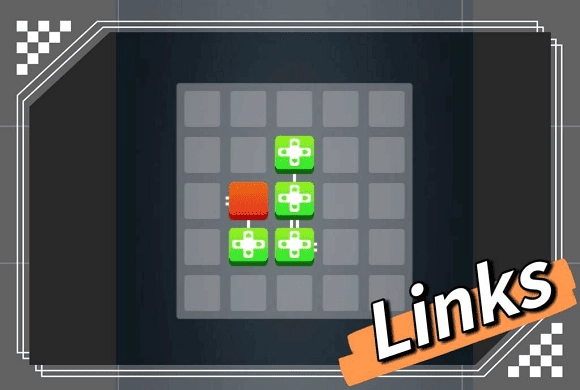
"LINKS" is a beautifully minimalist and deeply engaging logic puzzle game designed to sharpen your mind and help you relax. The game presents a clean, dark grid where your objective is to connect a single red starting block to all the yellow target blocks. Sounds simple? The challenge is that you must connect them in a single, continuous path without crossing your own line! With its sleek 2D graphics, intuitive swipe controls, and progressively challenging levels, "LINKS" is a fantastic brain-teaser for players of all ages. Whether you want to kill a few minutes or immerse yourself in hours of pathfinding logic, this game offers a satisfying and stress-free puzzle experience without any distracting timers.

Key Game Features

Minimalist Design: Enjoy a clean, distraction-free visual style with smooth animations. Logic Puzzles: Train your brain with pathfinding and continuous line challenges. Multiple Difficulties: Progress through Easy, Medium, and Hard level collections. Intuitive Controls: Simply drag your finger to draw the connecting path. Helpful Hints: Use the hint system if you get stuck on a tricky level. Offline Play: No Wi-Fi required; play anywhere, anytime at your own pace.

How to Play & Master

The goal of "LINKS" is to connect the red block to all the yellow blocks on the grid. Starting: Look at the grid. You will see one Red block (the starting point) and one or more Yellow blocks (the targets). Notice the small white connectors on the sides of the blocks. Connecting: Touch the Red block and drag your finger to draw a line towards a Yellow block. The Rules: Continuous Path: You must connect all the yellow blocks in one single, continuous line starting from the red block. Valid Connections: You can only connect to the sides of the blocks that have the white connector marks. No Crossing: Your line cannot cross over itself or overlap. Completing the Level: Once all yellow blocks are successfully connected in a single chain without breaking any rules, the level is completed! Mistakes: If you make a wrong turn, simply trace your finger backward along the line to erase it, or use the reset option to start the level over.

Game Controls

Drag: Touch the red block and drag to draw the connecting line. Reverse Drag: Drag backward along an existing line to erase it.

Frequently Asked Questions (FAQ)

Q: Can I connect the blocks in any order? A: Yes, as long as you form a single, continuous path that connects all the yellow blocks to the red one without crossing. Q: What if I get completely stuck? A: You can tap the "Hint" button (usually a lightbulb icon) to reveal a part of the correct path to guide you. Q: Why won't my line connect to the yellow block? A: Make sure you are drawing the line into the side of the yellow block that has the small white connection points. You cannot connect to a flat side.